Free Trial of Online SuiteCRM Product - Simple Customization or Integration for a Limited Time for Free
Your organization or company needs a CRM system tailored for managing customers or business opportunities effectively.
Introduction, Purpose, and Services
The open-source version of SugarCRM is a lively and easy-to-learn commercial open-source software. SugarCRM Corporation, founded in 2006, has rapidly gained significant influence globally as a customer relationship management software provider.
The Local CX solution aims to meet the needs of rapidly growing small businesses.

Technical Support Services
We are a premium SugarCRM technical support service provider in China, offering development, customization, and other support services to SugarCRM clients. We have skilled experts dedicated to this work.
Proficient CRM Data Migration Capabilities
Data migration involves more than just moving records from one CRM system to another. It is a daunting task that requires proper planning, well-thought-out strategies, and a thorough understanding of the current system. This is crucial to ensure a smooth, rapid, and secure data migration process. Poor data mapping can result in the loss of critical data and key functionalities. Furthermore, it can lead to unexpected impacts on post-migration data and rules. This becomes especially tricky when migrating to an instance used by multiple users (rather than a new instance). Therefore, even when importing thousands of records, care must be taken to ensure each individual record is fully migrated.
Data migration is one of the common requests we receive from clients. Over the years, we have successfully and seamlessly handled multiple SugarCRM migrations from various platforms for clients in different industries. Here are some popular data migration lists we offer to clients from different industries.
- Migration of data from Excel spreadsheets to Sugar
- Migration of Salesforce data to SugarCRM
- SuiteCRM data migration to SugarCRM
- VtigerCRM data migration to SugarCRM
- Microsoft Dynamics data migration to SugarCRM
- Zoho data migration to SugarCRM
CRM Integration with ERP, Data Analysis, and More
Moving data and behaviors from one CRM system to another, such as an ERP or data analysis system.
How to Use
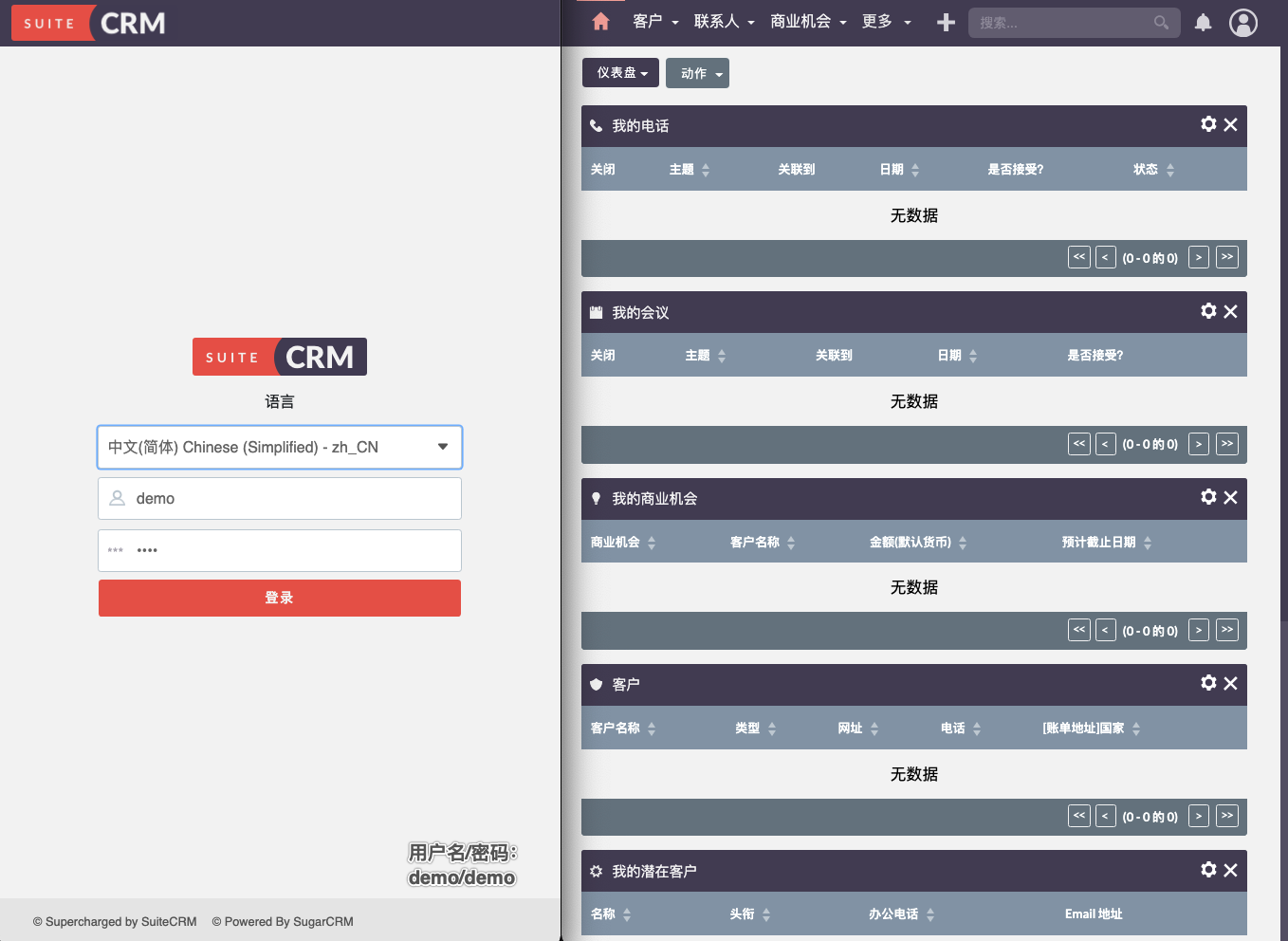
Open the URL in your browser: https://crm.carlzeng.com:3/
Trial username/password: demo/demo
Common Questions about SugarCRM
Questions listed below
Is SugarCRM free?
SugarCRM is an open-source solution, but we provide a free trial to ensure that we can meet all your unique business needs.
Is there free trial software available?
Yes! We offer a 7-day free trial period for clients based on their requirements. If you are interested in SugarCRM, we provide live demos; request a demo here. Feel free to reach out if you have any questions!
What happens after the trial period ends?
At the end of the trial period, we hope you have spent less time on spreadsheets or sorting through vague data and realize the authenticity and usability of Sugar CRM. Sugar CRM sales representatives can assist you in converting the trial version into a production instance. Otherwise, we appreciate you trying our software, and we value your feedback.
Does SugarCRM support multiple languages?
Yes! SugarCRM supports over 30 languages and offers a framework for adding more. As a global CRM, we provide a language pack framework that allows developers to establish support for any language in the display of user interface labels. Access the full language list here. Contact us via phone, email, or chat with us below!
Are there additional costs involved?
Optional products (such as prompts, plugins, LinkedIn Sales Navigator plugin, Oktopost) require additional payments. However, these products can enhance functionality or provide integration with other applications and are not mandatory.
Can I upgrade anytime?
Certainly! Reach out to your sales representative, and they will be happy to assist you!
What are SugarCRM custom field types?
Over the years, we have customized numerous SugarCRM fields for clients. Some of the many possibilities in SugarCRM field customization include phone field customization, custom email fields, autofill through postal codes.
Can relationships be added to “custom SugarCRM fields” to automatically update one field’s value by changing another field’s value?
Yes, indeed. It is possible to automatically update one field’s value by changing another field’s value through SugarCRM customization.
How to manually create custom fields in SugarCRM?
There are several convenient ways to create custom fields in SugarCRM. You can use Sugar Studio to create basic custom SugarCRM fields without writing any code, or you can contact certified SugarCRM partner organizations (such as TMC) for advanced customization based on your unique requirements.
What is Sugar Studio?
Sugar Studio is a tool in SugarCRM that allows users to add basic customizations to fields and can also change the appearance of modules.
How to access Sugar Studio in SugarCRM?
Sugar Studio is located on the administration homepage. Only users with administrator privileges can access it.
What is the purpose of having custom SugarCRM fields?
The default version of Sugar has only a few modules with default fields, including Marketing, Sales, and Support modules. However, in its default form, Sugar may not be useful for most businesses as each business has its unique processes and entities. Hence, it is common practice to add custom fields and modules and remove current fields and modules that are not necessarily relevant to the business’s CRM implementation.
Can validation be set for SugarCRM custom fields to automatically update one field’s value by changing another field’s value?
Yes, you can update one field’s value by changing another field’s value. This can be achieved through SugarCRM customization.
How to delete any unnecessary custom fields in SugarCRM?
If you do not have any coding knowledge, you can use Sugar Studio to delete any unnecessary custom fields.
Furthermore, you can also contact SugarCRM experts like TMC, who can complete the task for you through code.
Self-Deployment
docker-compose.yml
1 | version: '3.5' |
Uses the shared network template_default and a MariaDB database. Refer to: Sharing a single MariaDB (Docker Database Service) among multiple Docker containers.
Installation of Chinese Language Pack
Download link for Chinese Language Pack
Steps: Select “admin,” scroll down, find the “Module Loader” item under Developer Tools, upload the downloaded localization package, click on “INSTALL” that appears after downloading in that item to complete the installation. Then navigate to the admin interface, select the Simplified Chinese language from the local entries under the system dropdown list, and save. Reopen the system’s URL link and choose Simplified Chinese.

Sources of Inspiration
SugarCRM Product Feature Demo - SugarCRM Demo Trial
LouisheCOM - Free International Open Source Software SuiteCRM Service Provider
jontitmus-code/SuiteCRM8_dockerhttps://tmcsys.cn/dev-suitecrm-ui.html)