Enhancing Database Efficiency with a Single MariaDB Service across Multiple Docker Containers
Create a dedicated network:
- Define a custom network in your
docker-compose.ymlfile, such asdatabase_network, to isolate the database from other services:1
2
3networks:
database_network:
driver: bridge - If you’re using a pre-existing network, set
external: true.
- Define a custom network in your
Configure the MariaDB service:
- Instead of including a separate MariaDB service for each app, use a single instance with appropriate environment variables for each application to connect to the shared network. For example:
1
2
3
4
5
6
7
8
9
10
11
12
13
14
15
16
17
18
19services:
app1_db:
image: some-mariadb-image
environment:
MYSQL_ROOT_PASSWORD: app1_db_password
MYSQL_DATABASE: app1_db_name
MYSQL_USER: app1_db_user
MYSQL_HOST: db_container_name
networks:
- database_network
app2_db:
# ...
environment:
MYSQL_ROOT_PASSWORD: app2_db_password
MYSQL_DATABASE: app2_db_name
MYSQL_USER: app2_db_user
MYSQL_HOST: db_container_name
networks:
- database_network - Ensure the database container is started before the application containers.
- Instead of including a separate MariaDB service for each app, use a single instance with appropriate environment variables for each application to connect to the shared network. For example:
Database sharding (optional):
- If your application requires data partitioning, consider using a database sharding strategy to distribute the load across multiple MariaDB instances in the shared network.
Database management tools:
- Use a tool like phpMyAdmin or DataGrip that can connect to the
database_networkto manage and backup the shared database.
- Use a tool like phpMyAdmin or DataGrip that can connect to the
Monitoring and maintenance:
- Regularly monitor the performance and health of the shared database, and ensure backups are in place to protect against data loss.
By adopting this approach, you can significantly reduce the resource footprint and simplify database management across multiple Docker containers. Remember to update your application configurations accordingly.
Original Post: Read the original article
번역결과
제목: 여러 Docker 컨테이너 간의 단일 MariaDB 서비스를 활용한 데이터베이스 효율성 향상
태그: Docker, MariaDB, 데이터베이스 분산, Docker Compose, 데이터베이스 관리
카테고리: DevOps, Docker 최적화
저작권: 2024년卡尔·郑. 모든 권리를 보유합니다.
날짜: 2024년 3월 29일 10:45시
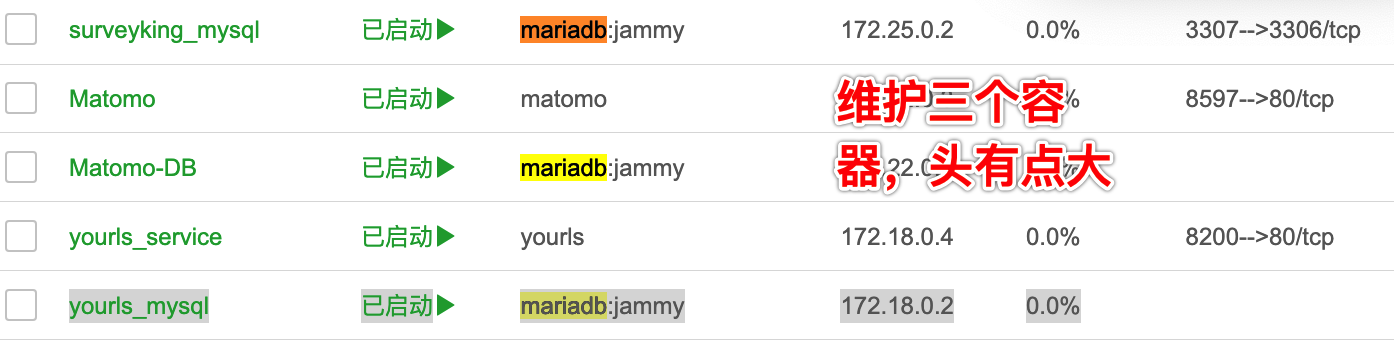
다중 Docker 컨테이너에서 각 애플리케이션에 별도의 데이터베이스를 관리하는 것은 리소스 낭비와 데이터 일관성 문제를 초래합니다. 여러 컨테이너 간의 단일 MariaDB 서비스를 공유함으로써 데이터베이스 관리를 간편화하고 전체 효율성을 높일 수 있습니다. Docker Compose를 사용하여这种方法을 구현하는 방법은 다음과 같습니다:
독립 네트워크 생성:
docker-compose.yml파일에 고유한 네트워크database_network를 정의하여 데이터베이스를 다른 서비스와 분리합니다:1
2
3networks:
database_network:
driver: bridge- 기존 네트워크를 사용하려면
external: true를 설정하세요.
MariaDB 서비스 구성:
- 각 애플리케이션에 대한 데이터베이스에 대한 별도의 MariaDB 서비스를 사용하지 않고, 공유 네트워크에 연결할 수 있는 적절한 환경 변수를 사용합니다. 예를 들어:
1
2
3
4
5
6
7
8
9
10
11
12
13
14
15
16
17
18
19
services:
app1_db:
image: some-mariadb-image
environment:
MYSQL_ROOT_PASSWORD: app1_db_password
MYSQL_DATABASE: app1_db_name
MYSQL_USER: app1_db_user
MYSQL_HOST: db_container_name
networks:
- database_network
app2_db:
# ...
environment:
MYSQL_ROOT_PASSWORD: app2_db_password
MYSQL_DATABASE: app2_db_name
MYSQL_USER: app2_db_user
MYSQL_HOST: db_container_name
networks:
- database_network - 데이터베이스 컨테이너가 애플리케이션 컨테이너가 시작되기 전에 시작되어야 합니다.
- 각 애플리케이션에 대한 데이터베이스에 대한 별도의 MariaDB 서비스를 사용하지 않고, 공유 네트워크에 연결할 수 있는 적절한 환경 변수를 사용합니다. 예를 들어:
데이터베이스 분산 (선택 사항):
- 애플리케이션이 데이터 분산을 요구하는 경우, 데이터베이스를 공유 네트워크의 여러 MariaDB 인스턴스로 분산하여 로드를 분산할 수 있습니다.
데이터베이스 관리 도구:
database_network에 연결하여 데이터베이스를 관리하고 백업하는 데 사용할 수 있는 phpMyAdmin 또는 DataGrip와 같은 도구를 사용합니다.
모니터링 및 유지 관리:
- 공유 데이터베이스의 성능과 건강을 정기적으로 모니터링하고 백업을 설정하여 데이터 손실 대비 보안을 보장합니다.
이러한 접근 방식으로 구현하면 여러 Docker 컨테이너 간의 리소스 부담을 크게 줄이고 데이터베이스 관리를 단순화할 수 있습니다. 애플리케이션 구성에 적절하게 업데이트하십시오.
원문 게시물: 기존 게시물